The accessibility statement French public websites must publish
We audited a French town's website and found no accessibility statement, only a contact line under the right heading. Here is what the statement must contain, who has to publish it, and why "not compliant" is a perfectly good place to start.
We recently audited the website of a French town: the home page and 17 internal pages, in read-only mode. The audit was an automated walk-through in a browser, followed by a manual check of every finding we kept. When we wrote up the summary, one finding went to the top of the list. The site had no accessibility statement.
You may know the term from elsewhere. Public bodies in the European Union must publish an accessibility statement under the Web Accessibility Directive, Directive (EU) 2016/2102, and French law applies that directive to the public sector. France gives the statement a fixed template, a notice on the home page and a regulator that checks it. If you build or run a public website in France, or have a French public client, this applies to you. If you only want to understand the document, the French version is a clear example of one.
Two questions, then: what goes into the statement, and who has to publish it.
The accessibility section held only a contact line
The page was not missing. That is what makes this case useful.
The town's legal notice page (the page French sites use for publisher and hosting details) had a section headed "Accessibilité". It contained one thing: an invitation to tell the town hall if you had trouble using the site. No other page mentioned accessibility at all.
A section with the right heading makes the subject look settled.
The page's code told the rest of the story. Its author had left a note there, invisible to visitors, asking for several items to be filled in before publication, accessibility information among them. The page went live before it was finished. We read that as an oversight by an organization acting in good faith.
Our report put the statement among the regulatory obligations to fix first.
What an accessibility statement contains
The principle is in article 47 of Law no. 2005-102. A public service publishes an accessibility statement and a multi-year accessibility plan, covering three years at most with an action plan for each year. Its home page says whether the service is compliant, and users must be able to report a failure.
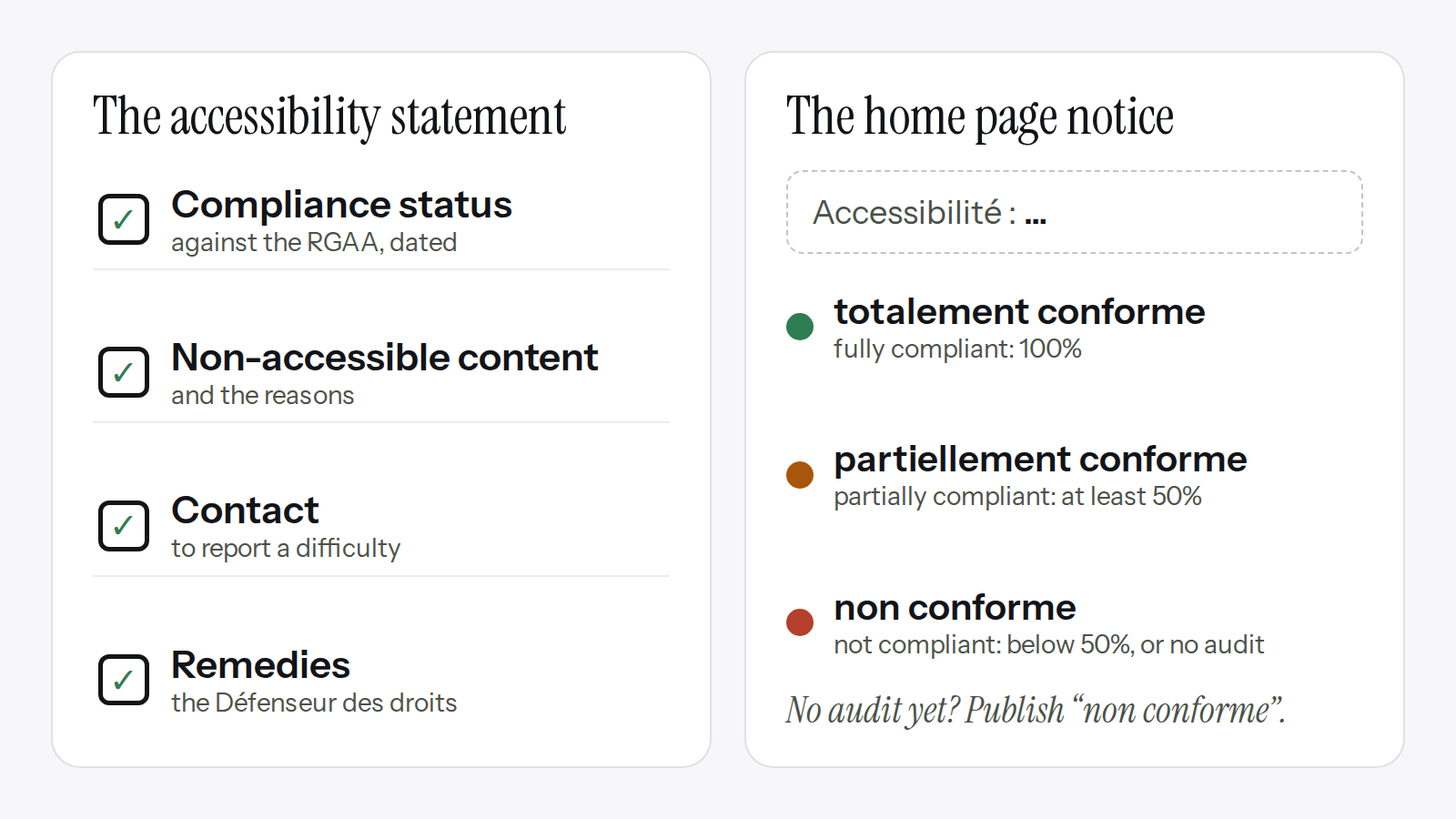
The content is set by article 6 of Decree no. 2019-768 and by the template of the RGAA, France's official accessibility standard for measuring public websites, maintained by the state's digital agency, DINUM. The RGAA 4.1.2 template has four sections:
- Compliance status: how far the site meets the RGAA.
- Non-accessible content: what fails, the reason, and any alternative offered.
- Contact: how to report a difficulty.
- Remedies: where to turn if that gets nowhere, namely the Défenseur des droits, France's rights ombudsman.
The statement also gives the date it was drawn up, in a set sentence ("Cette déclaration a été établie le…"). It must be updated at every redesign of the site, and no later than three years after it was published.
Then there is the home page. It carries a short notice in French, with one of three official levels:
- "Accessibilité : totalement conforme" (fully compliant): a compliance rate of 100%.
- "Accessibilité : partiellement conforme" (partially compliant): at least 50%.
- "Accessibilité : non conforme" (not compliant): below 50%, or no valid audit.
The "Accessibilité" page must be reachable from every page of the site, and DINUM recommends the address /accessibilite.
Look at the last level again. A site with no audit still publishes its statement, rated "non conforme". The official guidance says so, and it is exactly the fix our report proposed.
Who has to publish it
Article 47 (section I) and article 2 of the 2019 decree name three groups:
- legal persons governed by public law, which in France includes every town;
- some private bodies entrusted with a public service mission;
- companies with revenue above €250 million in France.
A town is covered whatever its size. There is no population threshold, so a village of a few hundred people has the same obligation as a city.
The decree also allows for a "disproportionate burden" (article 4). It can excuse an organization from making certain content accessible. It never excuses it from publishing the statement.
Private businesses under the European Accessibility Act are a separate case. Since June 28, 2025, some private services in France, such as online retail, banking and transport, must be accessible; they publish information on the accessibility of their service under the Consumer Code (article D412-57), not this statement. That deserves its own article.
Probably not the only town
We have audited one public website. That is far too few to count anything. Still, we are convinced this town is not an isolated case. That is our view, and the official figures point the same way.
In March 2025, DINUM and Arcom (France's regulator for audiovisual and digital communication) sent the European Commission France's monitoring report, the report France submits under article 8 of the directive. It covers 583 public websites checked in July 2024.
More than half of them had no accessibility statement: 325 out of 583. On 60.54% of them, the home page carried no accessibility notice. Of the 100 town websites in the sample, 55 had no statement.
These sites were a sample chosen for checking, not a census of every public website in France. The figures do not tell you how many French towns lack a statement. They do show that a town hall without a statement is far from alone.
Who checks, and what can follow
Since September 8, 2023, article 47-1 of the 2005 law has given the job to Arcom. It records the failure, issues a public formal notice, and can then impose a financial penalty and have it published. The cap is €25,000 for failures concerning the statement, the plan or the home page notice, and €50,000 for the site's lack of accessibility itself. A further penalty is possible if the failure continues for another six months.
Arcom has used the first step. In a decision of June 24, 2026, announced on July 6, 2026, it served formal notice on the ministry responsible for impots.gouv.fr, the national tax website, partly over how it displayed its accessibility level. When we searched on October 20, 2026, we found no financial penalty imposed by Arcom so far.
Publish "non conforme" rather than nothing
A statement that says "non conforme" is worth more than no statement. You can publish it without waiting for a full audit, and it is the page that tells residents who to contact when the site gets in their way.
The fix our report proposed was just that. Publish a statement with the four sections: the compliance status, rated "non conforme" until an RGAA audit has been done; the content known to be inaccessible; a contact; and the right to go to the Défenseur des droits. Then add the "Accessibilité : non conforme" notice to the footer.
If an agency runs your site, ask for it the way you would ask for the legal notice page: as a page the site cannot go without. That means three things. The statement on the official template, the notice on the home page, and a link to the page from every page. It is an easy page to forget, as this town shows: the section was started, and the site went live before anyone finished it.
Be clear about what the statement does not do. The accessibility findings we can see from the outside do not replace a full RGAA audit, which tests color contrast, keyboard use and screen readers. A "non conforme" statement is the starting point, and the audit comes after. In our site audits, we check these mandatory pages along with the accessibility problems a visitor can see.
Tomorrow, open your site's home page and scroll to the footer. Look for the words "Accessibilité :". If they are not there, or the page they lead to holds only a contact form, send your provider the official template and ask for the page.
Want to check this on every deployment?
Qaviar walks through your site like a visitor and shows you what changed.